See gear upgrades in game
Undying tells you whether an item is an upgrade for your class and spec, right where you meet the item: in its tooltip, on a quest reward, in your bags and in the auction house.
- Free
- No login
- Nothing sent automatically
What it does
UPGRADE HINTS
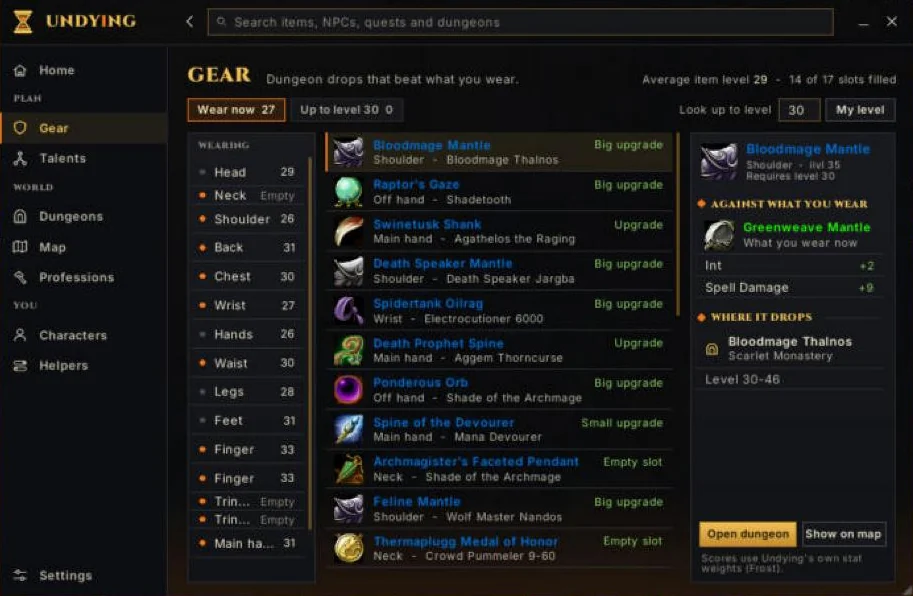
One line in the item tooltip says whether it's an upgrade for your spec, with the reason when you hold Shift. Quest reward choices and bag items you can wear get an upgrade mark. Uses Undying's own stat weights for your class and spec, not the site gear planner's weights.
AUCTION HOUSE UPGRADES (BETA)
Beta: new and still being worked on until the next full release. Gear in your auction searches that's an upgrade for you gets the green upgrade arrow and its size. An Upgrades for you list beside the auction window shows every upgrade you've seen, by slot, with the lowest price. Click one to search for it, and drag the list anywhere.
Where to find it
Hover any item you can wear. The Gear page in the Undying window shows what you have on, slot by slot. The auction list appears beside the auction window once you have searched.
What it does not do
- It does not equip, buy or bid on anything for you.
- It uses Undying's own stat weights for your class and spec. The gear planner on this site ranks by stat total and item level, so the two can disagree.
- Auction upgrades are Beta and only cover items your own searches have seen.
On this site
- Gear plannerPlan every slot in your browser and share the link.
- ItemsEvery WoW Forever item from the game files.